Build your first
useful thing.
This optional coding project builds a desktop focus tool in four small steps. Your first useful milestone is simply a window with three tasks you can edit.
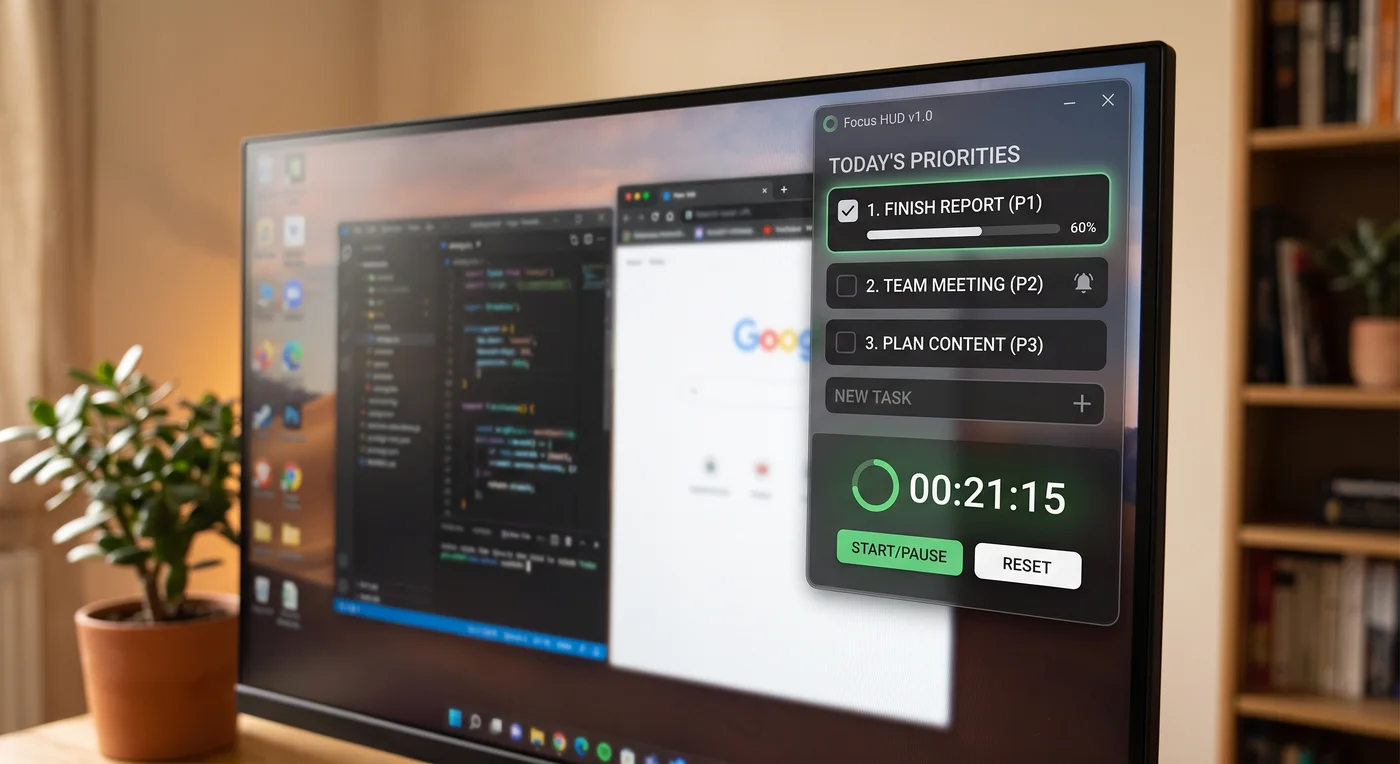
The project: a three-block Focus HUD
The idea is intentionally simple: a lightweight desktop utility that keeps only three critical tasks in view. It has a focus timer, a quick scratchpad, and a local record of its state. It does not need a login, cloud sync, calendar access, or a pile of settings.
Python with CustomTkinter is a practical starting point for this lesson. CustomTkinter supplies the window controls and styling; Python handles the timer and saved data. Ask the agent to check that Python and its Tk support are available on your operating system.
The rule: use the agent in small loops.
Do not hand an agent the whole vision and hope for the best. Give it one bounded milestone, run what it makes, and decide what should happen next. This is how you stay the builder even when the agent writes the code.
Before you build
Ask your preferred LLM to guide the setup for your computer. The details change by operating system, so let the agent inspect what you have rather than memorizing a long list of commands.
"I am on [Windows, macOS, or Linux] and want to build a small local Python desktop app called Focus HUD. First, inspect whether Python, Git, and GitHub CLI are installed. Tell me what is missing and give me one setup step at a time. Do not start building the app until I confirm each install worked. Use a virtual environment for this project."
You can get the local window working before connecting GitHub. When you want a remote copy and are signed in to GitHub CLI, the agent can help create a private repository, add a sensible ignore file, make the first commit, and push it. Lesson 01 explains the mental model; you still review what will be included before it is committed.
"Create a private GitHub repository named focus-hud. Initialize a Python project with a virtual environment, a README, requirements file, and an appropriate .gitignore. Show me the proposed file list and wait for my approval before any commit or push. Once approved, commit only those files, push, and give me the repository link."
Build it in four check-ins
Each phase should leave you with something you can run and inspect. First edit all three rows. Then save, close, and reopen with the same data. Next test Start, Pause, and Reset while editing a task. Only then test a separately packaged copy. If a phase feels too big, break it down again.
Make it visible
Build a compact dark window with three editable task rows and checkboxes. Saving, notes, and the timer come later.
Make it remember
Add a scratchpad, then save tasks and notes in a local JSON file, a plain-text format for structured data. Reopen the app to check that your work is still there.
Make it behave
Use the GUI event loop for the timer, add an always-on-top option, and let the app notify you when a focus block ends.
Make it easy to launch
Package the finished app for your own computer. Keep the source project in GitHub and the app data outside the project.
Prompts for the first two milestones
“Build only the first screen: three editable task slots labeled P1, P2, and P3 and a checkbox for each. Do not add notes, a timer, or saving yet. Keep it readable at my display scaling. Show me how to run it. Stop when I can open the window and edit all three tasks.”
“Add a scratchpad and save tasks and notes in a user-data folder outside the repository. Use JSON, save after a short typing pause, and preserve a recoverable copy if a write fails. Explain the location. Test closing and reopening, an empty file, and an unreadable file. Do not silently erase existing data.”
Keep three active task slots. For the first version, archive completed tasks only when you choose “Start a new day.” Preview what moves to history and keep unfinished tasks. Automatic midnight cleanup can wait until that behavior is dependable.
The prompt that keeps the timer honest
The most common beginner timer mistake is blocking the interface with a sleep call. A desktop interface has an event loop already; the timer needs to schedule short updates through that loop so the window stays responsive.
"Add the focus timer without freezing the interface. Use the GUI event loop and scheduled callbacks, not time.sleep() or a blocking loop. Keep start, pause, and reset testable. Use elapsed time rather than counting callbacks, and document what happens if the computer sleeps. Repeated clicks on Start must not create duplicate timers. Explain where the timer state lives and how I can verify the window stays responsive while it runs."
Also tell the agent to use the framework's supported scaling behavior before adding custom Windows-specific code. CustomTkinter documents appearance modes and HighDPI support, so start with the framework before solving a problem you may not have.
Keep version one intentionally boring
- Three tasks
- Local JSON state
- One countdown timer
- Simple local history
- Calendar integrations
- Cloud sync or accounts
- Webhooks and automations
- Sharing data with anyone else
Small scope lets you recognize a working result and isolate what needs fixing.
Package only after it works
Once the app works, ask the agent to package it with PyInstaller. Start with CustomTkinter’s documented folder-based build and include its theme and font files. Build on the operating system you intend to use, then test the packaged app separately from the development version.
“Follow the current CustomTkinter packaging guide to make a folder build for my operating system. Include required data files and explain which folder to keep together. Verify that the packaged app opens, saves outside its installation folder, reopens my tasks, and runs the timer. Do not publish it yet.”
Make the smallest version work first
Your first win is an editable window. Keep saving, the timer, and packaging as separate milestones so a problem is easier to isolate.
Your starting information
P1: Plan one focused work block
P2: Review one draft
P3: Take a short break
Build only a local prototype of the Focus HUD with three editable task rows labeled P1, P2, P3 and a checkbox for each. Use the sample tasks above. Tell me which files you created and the exact command to launch it. Do not add accounts, connections, packaging, or background activity. Stop so I can open and test the window.
Check the expected result
Illustrative answer · check your own result first
- A local window opens with all three sample tasks, editable text, and working checkboxes.
- Closing the prototype exits it cleanly. Saving tasks between launches is not required at this milestone.
- If it fails, share the error message after removing personal file paths or secrets. Ask the agent to fix that one issue before adding another feature.
You are ready to move on when…
- I opened the app and changed every task myself.
- I know how to close it and run it again before adding saving or a timer.
Choose your next experiment.
On the builder route, decide what is worth extending next. You can also capture the instructions that helped as a reusable playbook.
Builder route: go further →Create a reusable playbook →Return to the learning path →